
The “Suggest current work” pop-up is a Beta feature in the Toggl desktop app that offers to start a timer based on your recent activity. It is separate from Smart Suggestions, Auto-Tracker, and reminders, and it has its own setting for each device.
Turn off Suggest current work
1. Open the Toggl desktop app and go to My activity.
2. Click the AI button above the timeline, labelled Name activities with AI.
3. Under Suggest current work, select Off.
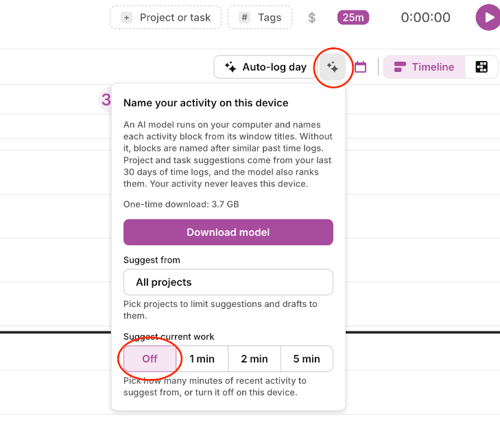
This setting applies only to the device where you change it. If you use Toggl on another computer, repeat these steps there.
Why the pop-up still appears when Smart Suggestions is off
Smart Suggestions and Suggest current work are separate features. Turning off Smart Suggestions, Auto-Tracker, or reminders does not turn off this pop-up.
Selecting Not work or closing the panel with X dismisses the current suggestion only. To stop future pop-ups, set Suggest current work to Off.
If the pop-up continues
Confirm that Suggest current work is set to Off on the device where the pop-up appears. If it continues after restarting the desktop app, contact Toggl Support and include your operating system and Toggl desktop app version.