---
title: Rounding in Toggl 2.0
description: Round time entries up, down, or to the nearest interval on your reports — set the rule and interval that fit your workflow. (
---
[Skip to content](https://docs.toggl.com/rounding#main-content)
English
Show submenu for translations
[](https://docs.toggl.com/?hsLang=en)
Open main navigation
Close main navigation
- English
Show submenu for translations
- [Go to Toggl](https://focus.toggl.com/)
[Go to Toggl](https://focus.toggl.com/)
How can we help you?
- There are no suggestions because the search field is empty.
1. [Toggl 2.0 Knowledge Base](https://docs.toggl.com/?hsLang=en)
2. [Using Toggl, page by page](https://docs.toggl.com/using-toggl-page-by-page?hsLang=en)
3. [Reports](https://docs.toggl.com/using-toggl-page-by-page?hsLang=en#reports)
# Rounding in Toggl 2.0
## Adjust how your tracked time appears on reports by rounding entries up, down, or to the nearest interval.
If you'd rather see clean, round numbers on your reports instead of exact tracked durations, turn on rounding. It lets you set a rule and a time interval, and Toggl 2.0 applies that rounding to your reports automatically — your original time entries stay untouched.
Rounding is available on the Starter plan and higher.
#### Turning on rounding
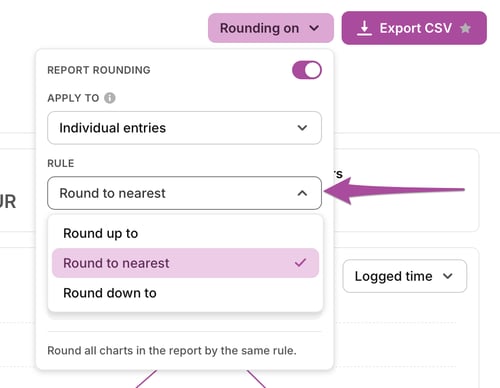
Rounding lives in **Reports**. Look for the **Rounding** button near the **Export** button in the top-right corner, and click it to open the rounding settings.

#### Rounding individual entries vs. grouped entries
Before picking a rule, decide whether rounding should apply per entry or per group:
- **Individual entries** — each time entry is rounded on its own, separately from any others.
- **Grouped entries** — Toggl 2.0 first adds up all entries in a group or sub-group exactly as tracked, then rounds that combined total.
This matters most if you're viewing grouped reports — grouping first and rounding second can give a different result than rounding each entry individually.
#### Choosing a rounding rule
Pick one of three rules for how rounding should behave:
- **Round Up To** — rounds every entry up to the next interval.
- **Round to Nearest** — rounds to whichever interval boundary is closer.
- **Round Down To** — rounds every entry down to the previous interval.
``
#### Setting the interval
Once you've picked a rule, choose the interval it applies to. Available intervals are:
- 1 minute
- 5 minutes
- 6 minutes
- 10 minutes
- 12 minutes
- 15 minutes
- 30 minutes
- 1 hour
- 4 hours
#### Tips and suggestions
- Rounding is applied at the report level — it never edits or overwrites your original time entries.
- If your reports look off after grouping, check whether rounding is set to apply before or after grouping — see [Individual entries vs. grouped entries above](https://docs.toggl.com/rounding#GroupedvsIndividual).
- Pair rounding with [Billable rates](https://docs.toggl.com/billable-rates-in-toggl-2-0?hsLang=en) if you're rounding time for client invoicing, so billed totals match what appears on the report.
- [Getting started](https://docs.toggl.com/getting-started?hsLang=en#main-content)
- [Start here](https://docs.toggl.com/getting-started?hsLang=en#start-here)
- [Quickstart Guides](https://docs.toggl.com/getting-started?hsLang=en#quickstart-guides)
- [Set up your Workspace](https://docs.toggl.com/getting-started?hsLang=en#set-up-your-workspace)
- [Toggl Guides for Toggl Track and Toggl Plan users](https://docs.toggl.com/getting-started?hsLang=en#toggl-guides-for-toggl-track-and-toggl-plan-users)
- [Using Toggl, page by page](https://docs.toggl.com/using-toggl-page-by-page?hsLang=en#main-content)
- [Timer](https://docs.toggl.com/using-toggl-page-by-page?hsLang=en#timer)
- [Reports](https://docs.toggl.com/using-toggl-page-by-page?hsLang=en#reports)
- [Projects](https://docs.toggl.com/using-toggl-page-by-page?hsLang=en#projects)
- [Tasks](https://docs.toggl.com/using-toggl-page-by-page?hsLang=en#tasks)
- [Timeline](https://docs.toggl.com/using-toggl-page-by-page?hsLang=en#timeline)
- [Members](https://docs.toggl.com/using-toggl-page-by-page?hsLang=en#members)
- [Approvals](https://docs.toggl.com/using-toggl-page-by-page?hsLang=en#approvals)
- [Time Off](https://docs.toggl.com/using-toggl-page-by-page?hsLang=en#time-off)
- [Profile Settings](https://docs.toggl.com/using-toggl-page-by-page?hsLang=en#profile-settings)
- [Admin Settings & Security](https://docs.toggl.com/admin-settings-security?hsLang=en#main-content)
- [Workspace Setup](https://docs.toggl.com/admin-settings-security?hsLang=en#workspace-setup)
- [Tracking & Rates](https://docs.toggl.com/admin-settings-security?hsLang=en#tracking-rates)
- [Single Sign-on](https://docs.toggl.com/admin-settings-security?hsLang=en#single-sign-on)
- [Subscription & Billing](https://docs.toggl.com/subscription-billing?hsLang=en)
- [Toggl Apps](https://docs.toggl.com/toggl-apps?hsLang=en#main-content)
- [Mobile](https://docs.toggl.com/toggl-apps?hsLang=en#mobile)
- [Desktop](https://docs.toggl.com/toggl-apps?hsLang=en#desktop)
- [Browser Extension](https://docs.toggl.com/toggl-apps?hsLang=en#browser-extension)
- [API & Integrations](https://docs.toggl.com/api-integrations?hsLang=en)
- [Troubleshooting & FAQs](https://docs.toggl.com/troubleshooting-faqs?hsLang=en#main-content)
- [My Toggl Acount](https://docs.toggl.com/troubleshooting-faqs?hsLang=en#my-toggl-acount)
- [Common Questions](https://docs.toggl.com/troubleshooting-faqs?hsLang=en#common-questions)
Copyright © 2026. Toggl. [Privacy Policy](https://toggl.com/legal/focus/privacy/)