Whose time can you see?
Admins see everyone’s time. Team Leads see their team’s time, and Project Managers see everyone’s time on the projects they manage, including sub-projects. Everyone else sees only their own time. Team Leads and Project Managers can also filter and group by Member.
Time Entries Table
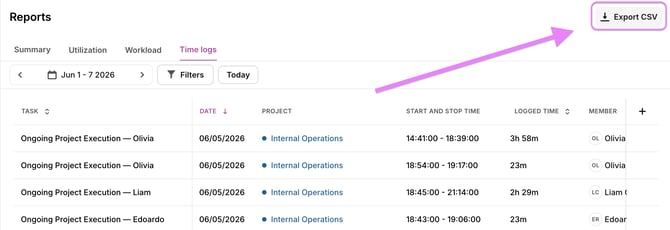
In the table, you can get an in-depth overview every time entry in Toggl 2.0, apply filters and adjust the time period.
Sorting
You can sort entries by clicking on any column header.
Filtering
You can modify filters by clicking on the filter selector. Filtering on time log description is also available.
Customizing Columns
You can move columns around and hide or unhide columns.
Bulk edit
- In the Time Log Report, select the entries you want to update.
- Use the bulk edit panel to apply changes.
- You can bulk edit:
- project
- task
- billable / non-billable
- tags
- duration
- description
- start date
- end date
Time logs without a task can’t inherit tags. If your workspace requires tags on time logs, a bulk edit that would leave any selected time log with no tags (its own or its task’s) can’t be saved.
Exporting
You can export the Time Logs report as CSV or PDF. Click the Export button at the top of the report and choose your preferred format.