
Time Off in Toggl lets you log days off. That personal log is included on paid plans. Time Off Pro is a paid add-on that turns it into a managed, team-wide system with approvals, balances, and policies.
Overview
Every Toggl workspace on a paid plan includes a personal way to record time off. Open Time off in the sidebar to:
- Log your own time off
- See Who’s out this week
- Jump to the holiday calendar
Time Off Pro adds:
- Approvals — requests can require sign-off from a Team Lead or Admin
- Balances — track how much time off each person has accrued, taken, and scheduled
- Types and policies — define vacation, sick leave, parental leave, and other rules
- Team time off — view, approve, and log time off for your team
- Reports — Time Accounting, and Absence & balances
The module is organization-wide. If you use Toggl Track and Toggl 2.0, one Time Off Pro subscription covers both.
Paid plan vs Time Off Pro
| Capability | Paid plan (no module) | Time Off Pro |
|---|---|---|
| Log your own time off | Yes | Yes |
| See your own entries | Yes | Yes |
| See who’s out this week | Yes | Yes |
| Open the holiday calendar from Time Off | Yes | Yes |
| Admins log time off for a member | Yes — dates only, from Members | Yes — with type, amount, note, and a notification to the member |
| Approval workflow | No | Yes |
| Balances (accrued / taken / scheduled) | No | Yes |
| Time-off types and policies | No | Yes |
| View and approve team requests | No | Yes |
| Time Accounting and Absence & balances reports | No | Yes |
Native Time Off isn’t available on the Free plan. Free organizations still see Time off in the sidebar: it opens a preview of the paid Time Off page, with options to upgrade the plan or start a Time Off Pro trial.
A Time Off Pro trial can be started without a paid plan. Keeping Time Off Pro after the trial needs an active paid Toggl plan.
The Time Off page
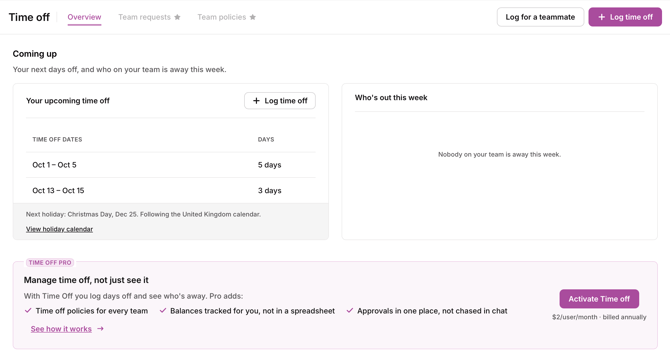
Open Time off from the sidebar. Paid plans — with or without Time Off Pro — land on the same Overview.
Coming up
- Your upcoming time off — your next dates, with a Log time off (paid plan) or Request time off (Time Off Pro) button
- Who’s out this week — who is away, and on which dates
- Next holiday — the next public holiday, with a View holiday calendar link
Time Off Pro extras on Overview
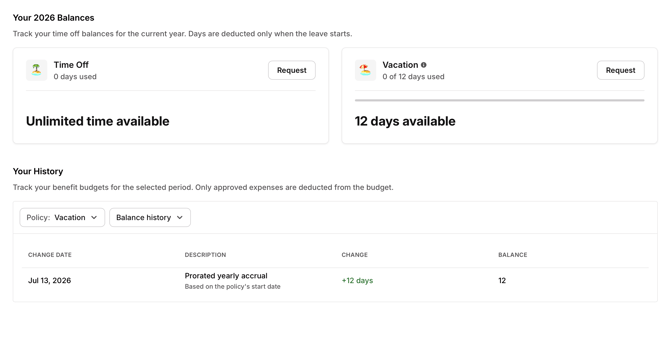
With Time Off Pro, Overview also shows your balances for the current year and your balance history. Days come off a balance when the leave starts.
Without Time Off Pro, Overview shows a Time Off Pro banner and sample balance / history cards, so you can see what the module adds. Use Activate Time Off or See how it works to start a trial or learn more.
On the Free plan
Opening Time off shows a preview: “See who’s away before you plan the week.” It uses sample data. From there you can Stay on Free, Upgrade to Starter, or Try Pro free for 30 days.
During a Time Off Pro trial
The Time off item in the sidebar keeps its star. Subscription managers also see how many trial days remain.
Roles and permissions
These permissions work the same way whether your organization uses Track, Toggl 2.0, or both.
Owner / Admin
Create and manage types and policies, manage balances, log time off for any member, approve or reject any request, view everyone’s time off, and manage the Time Off Pro subscription and seat assignments.
Team Lead
Approve or reject requests from their own teams, and log time off for members they lead. Team Leads log time off from the Time Off page. The Time off column on the Members page is available to Owners and Admins.
Member
Request their own time off, view their own entries and balance, and view available types. When someone logs Time Off Pro leave for them, they get an in-app notification and an email. They can cancel an upcoming entry from Your time off.
Without an assigned Time Off Pro seat, a member keeps the personal Time Off included with a paid plan.
Log time off for a member
An Owner or Admin can log Time Off Pro leave for any member. A Team Lead can do this for members of their teams.
Time off you log for a member is approved immediately and does not enter the approval queue. It counts against the selected balance even when that takes the balance below zero.
From the Time Off page
- Open Time off from the sidebar.
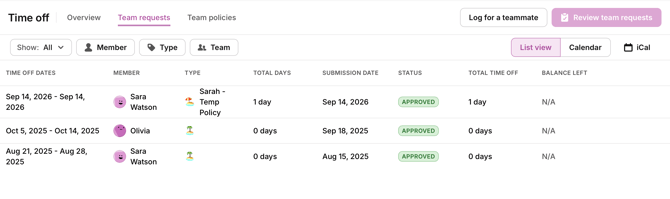
- Select Team requests, or Team time off if approvals are turned off. From Overview you can also click Log for a teammate.
- Click Log member time off.
- Select the member.
- Select the time-off type.
- Select the dates.
- Adjust the amount for each date if the person isn’t taking a full day.
- Add a note if needed.
- Click Add time off. The member receives an in-app notification and an email.
From the Members page
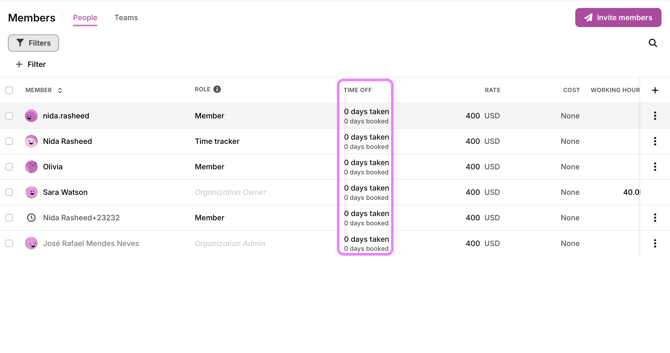 The Members page has a Time off column for Owners and Admins. It shows each member’s time taken through today and time booked for later in the current calendar year.
- Open Members from the sidebar.
- Find the member.
- Click their Time off cell.
- Select the time-off type.
- Select the dates.
- Adjust the amount for each date if needed.
- Add a note if needed.
- Click Add time off. The member receives an in-app notification and an email.
This opens the same dialog as the Time Off page, with the member already selected.
Without Time Off Pro, the same column opens the date-only flow and the member is not notified — see Availability settings: time off, work hours, and public holidays.
What the member sees
When someone logs Time Off Pro leave for a member:
- A notification appears in their notification tray
- They receive an email
- The entry appears under Your time off and on their calendar
- Their available capacity is reduced for those dates
- They can open and cancel an upcoming entry
You can’t edit or cancel an entry after logging it. If an upcoming entry is wrong, ask the member to cancel it from Your time off, then log the corrected entry.
Getting Time Off Pro
There are two ways for an admin to turn on Time Off Pro.
1. Start a free 30-day trial
- No credit card required
- The trial runs for 30 days
- Each organization gets one trial across Toggl Track and Toggl 2.0. Once it’s been used — even if it expired or was cancelled early — that organization can’t start another
- When the trial ends, approvals, balances, types, and team views turn off. Everyone on a paid plan keeps native Time Off
- To get Time Off Pro back after a trial, subscribe
2. Subscribe
- An admin can add Time Off Pro as a paid add-on at any time
- It appears as a separate line on your existing Toggl invoice
- Your organization needs an active paid Toggl plan (or an active trial) to keep Time Off Pro after the trial. If you’re on the Free plan, upgrade the core plan before you subscribe. The 30-day trial itself does not require a paid plan
Pricing and billing
- Per seat — you pay for the users you assign to the module, not the whole organization
- Annual billing is 12× the monthly price — there is no annual discount
- Time Off Pro charges appear as a separate line item on your existing subscription invoice
- If a user uses Time Off Pro in both Toggl Track and Toggl 2.0, you’re billed once for that person
Subscribing gives the organization access to the module; it does not assign it to every person automatically. An admin assigns members from Admin settings → Organization → Overview → Modules → Time Off → Manage access (the same Modules card is on Billing and Explore plans). Access can also be changed per member from their member page. Add someone and the charge goes up; remove them and it goes down.
Troubleshooting
Time off I didn’t book appeared on my calendar. An Owner, Admin, or Team Lead logged it for you. You should also receive an in-app notification and email. For an upcoming entry, open it under Your time off to cancel it if it’s incorrect.
I can’t see the Log member time off button. Open Team requests or Team time off. Owners and Admins can use the button for any member. Team Leads can use it for members of their teams. Members don’t see it.
I can’t see the Time off column on the Members page. The column is for Owners and Admins, on the in-product Members page — not in the Admin Console.
I logged the wrong time off for a member. There is no admin-side edit or cancel action. For an upcoming entry, ask the member to cancel it under Your time off, then log the corrected entry.
I can’t see approvals, balances, or policies. Your organization hasn’t enabled Time Off Pro yet, or you haven’t been assigned a seat. Ask an admin to start a trial or subscribe, and to assign you.
I’m on the Free plan. What do I see under Time off? Native Time Off is included on paid plans. On Free, Time off opens a preview of the paid page. Upgrade to Starter (or above) to log your own time off, or ask an admin about a Time Off Pro trial.
Some people can see approvals and balances, but I can’t. You likely haven’t been assigned a seat yet. Ask an admin to assign you to Time Off Pro.
These features used to work, but stopped for everyone. The organization’s trial probably ended without a subscription. An admin can subscribe to restore access. Personal time off stays available on paid plans.
I don’t see the option to start a trial. Your organization has already used its one-time trial. Subscribe to get Time Off Pro.
Time Off Pro stopped working after a billing change. The Time Off Pro subscription was likely cancelled. Re-subscribing restores it. Cancelling Time Off Pro never affects your core Toggl plan.
I only see my own time off, nothing for my team. That’s expected without an assigned Time Off Pro seat. Team management requires Time Off Pro plus Owner, Admin, or Team Lead access.