
What's in the Daily Brief
The email is sent at 8:00 in your local time, every weekday.
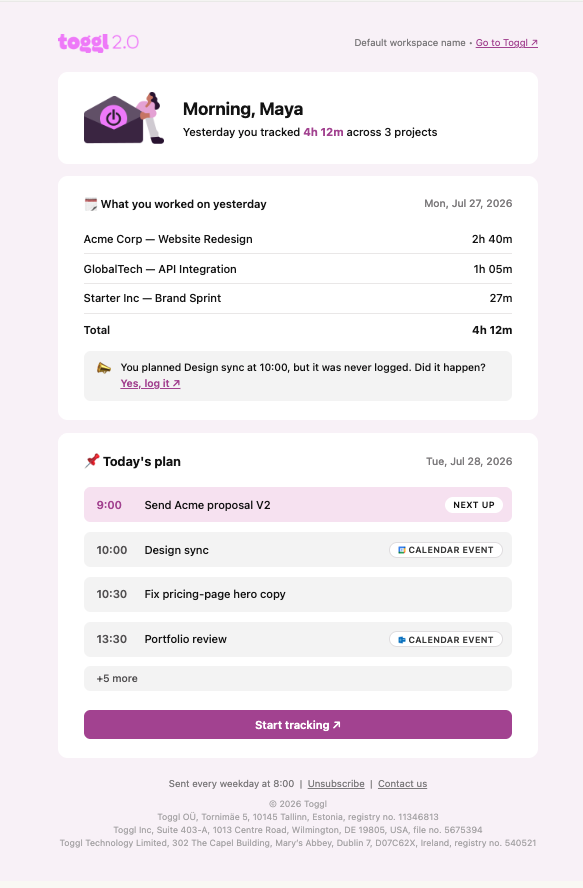
Yesterday
A summary of your tracked time from the previous day, including:
- Total time tracked
- A per-project breakdown
Today's plan
Your planned entries and any connected calendar events, listed in chronological order. This includes:
- A NEXT UP marker showing what's coming up next
- Badges showing whether an event came from Google Calendar or Outlook
If you don't have a calendar connected yet, this section shows a prompt to connect one instead of a plan.
Reconcile nudge
If you had a planned block yesterday that was never logged, the Daily Brief asks Did it happen?
- Clicking it takes you to the calendar with a prefilled log popover, ready to save
- If more than one planned block went unlogged, the link takes you to that day on the calendar instead of a single popover
- Planned events from a calendar you’ve hidden in Settings → Connected calendars can still appear here.
When the Daily Brief is sent
The Daily Brief is only sent when there's something worth showing you — either tracked time from yesterday or a plan for today. If neither exists, no email is sent.
It's also skipped if you've already tracked time today by the time the email would go out.
Turning it off
The Daily Brief is on by default. To stop receiving it:
- Go to Profile Settings > Preferences > Email Notifications
- Find the Email me a daily brief every weekday morning toggle
- Turn it off
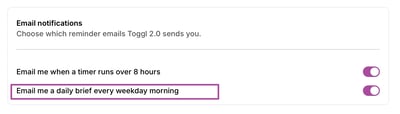
You can turn it back on the same way at any time.